> ## Documentation Index
> Fetch the complete documentation index at: https://statsig-4b2ff144-mintlify-add-local-eval-country-note-96362.mintlify.site/llms.txt
> Use this file to discover all available pages before exploring further.
# Metric Family
> Making it easier to manage metric variant.
It can be difficult to managing a large catalog of metrics that are a slight variant of one another. A common challenge we hear is the difficulty of ensuring that each metric variant inherit the same changes when the metrics need to be updated.
Metric Families let you create metric variants as child metrics of a parent metric. When a parent metric is updated, those changes automatically cascade to its child metrics, keeping all related metric definitions consistent and in sync.
The table below lists all supported metric types along with the modifications that can be applied to their child metrics.
| Available Metric Type | Modifiable Configs | |
| --------------------- | --------------------------------------------------------------------------------------------------------------------------------- | - |
| SUM
COUNT | - Add metric source filter
- Outlier Management
- Variance Reduction
- Cohorts and Delayed Data
| |
## Getting Started
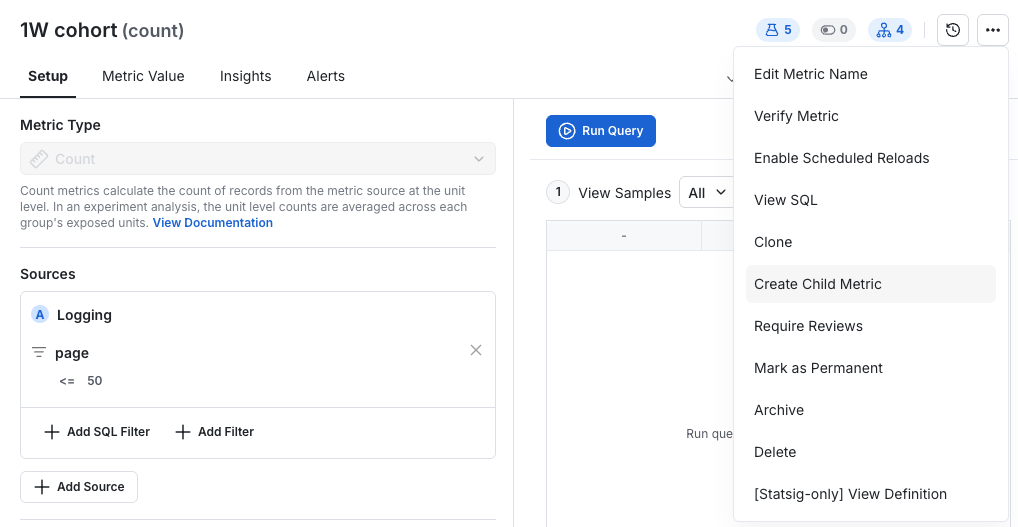
To create a child metric look for the “Create Child Metric” option the the drop down menu found in the top right corner of a metric.
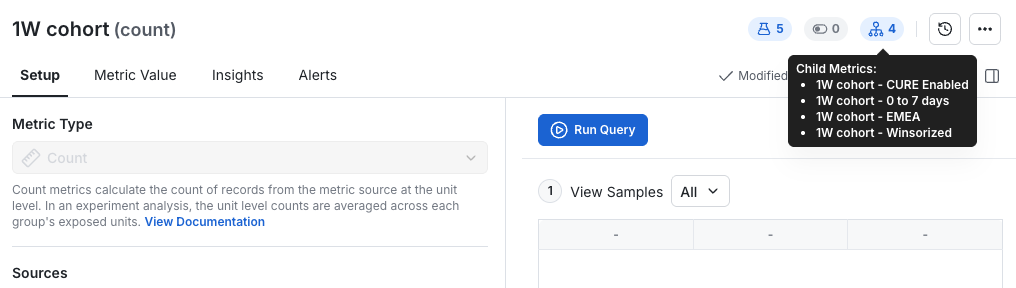
 You will be able to track the child metrics for a given parent metrics in the top right metric family icon
 ## Deleting and Archiving
When a parent metric is deleted or archived, all of its child metrics are deleted or archived as well. Re-enabling the parent will automatically restore those child metrics. Child metrics disabled through the parent cannot be restored individually—they can only be re-enabled by restoring the parent metric.
## Deleting and Archiving
When a parent metric is deleted or archived, all of its child metrics are deleted or archived as well. Re-enabling the parent will automatically restore those child metrics. Child metrics disabled through the parent cannot be restored individually—they can only be re-enabled by restoring the parent metric.
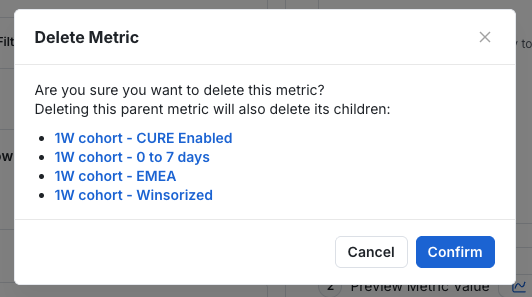 If a child metric is deleted or archived independently of its parent, it can be restored on its own—but it will return as a standalone metric, without its original parent-child relationship.
## In Experiments
Clicking on a Parent Metric option in Experiment setup will add all of it's child metrics as well. You can remove any metrics you don’t need in the experiment
If a child metric is deleted or archived independently of its parent, it can be restored on its own—but it will return as a standalone metric, without its original parent-child relationship.
## In Experiments
Clicking on a Parent Metric option in Experiment setup will add all of it's child metrics as well. You can remove any metrics you don’t need in the experiment