> ## Documentation Index
> Fetch the complete documentation index at: https://statsig-4b2ff144-mintlify-add-local-eval-country-note-96362.mintlify.site/llms.txt
> Use this file to discover all available pages before exploring further.
# Datadog
### Overview
Triggers can be used with Datadog to toggle a gate on or off depending on the performance of a metric.
### Creating a Trigger
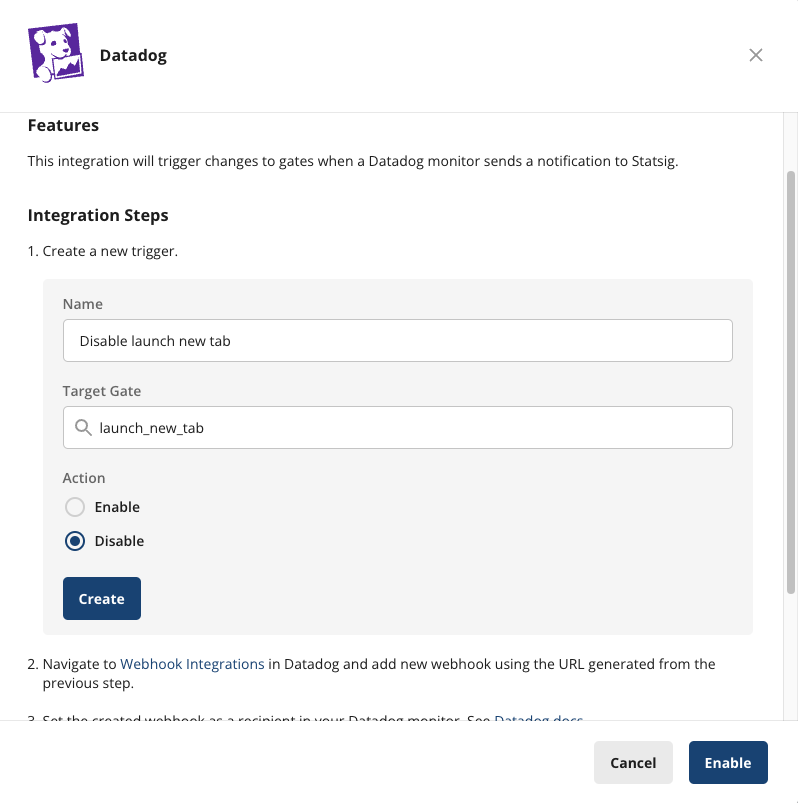
1. On Statsig console, navigate to the [integrations](https://console.statsig.com/integrations) tab.
2. Find and open **Datadog** -> **Triggers**.
3. Specify the target gate and action, then click **Create**
 ### Connecting to Datadog
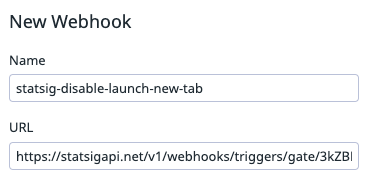
1. Copy the trigger URL generated from the previous step.
2. In Datadog, create a new [Webhook](https://app.datadoghq.com/integrations/webhooks) using that URL. (You do not need to make any changes to the payload)
### Connecting to Datadog
1. Copy the trigger URL generated from the previous step.
2. In Datadog, create a new [Webhook](https://app.datadoghq.com/integrations/webhooks) using that URL. (You do not need to make any changes to the payload)
 3. Now within your Datadog monitor settings, you can add this webhook as a notification target.
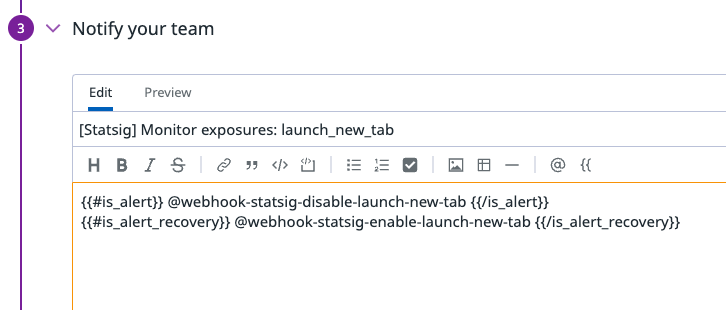 To learn more about how to configure a Datadog monitor, see [Datadog Notifications](https://docs.datadoghq.com/monitors/notify/).