> ## Documentation Index
> Fetch the complete documentation index at: https://statsig-4b2ff144-mintlify-add-local-eval-country-note-96362.mintlify.site/llms.txt
> Use this file to discover all available pages before exploring further.
# Feature Gate overrides
> During development, it can be useful to explicitly state which users should pass or fail a given feature gate. This is where overrides come in.
## Override results of a feature gate
During development, it can be useful to explicitly state which users should pass or fail a given feature gate. This is where overrides come in.
Overrides are based of user IDs and can be set to pass or fail for a given user ID. During evaluation of a gate, if the user ID is overridden, the overridden result will be returned immediately before any rules are evaluated.
### Adding an Override
* Log into the Statsig console at [https://console.statsig.com](https://console.statsig.com)
* On the left-hand navigation panel, select **Feature Gates**
* Select the feature gate where you want to add an Override
* Click the **Add Override** button
 * Select either 'Pass List' or 'Fail List' from the tabs in the dialog
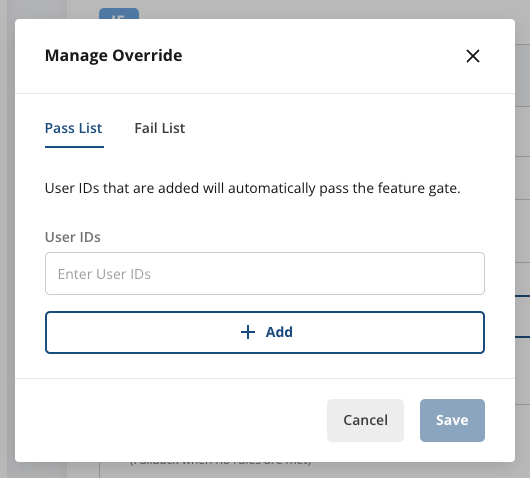 * For users you want to pass the gate, add them to the 'Pass List'
* For users you want to fail the gate, add them to the 'Fail List'
A user can only exist on one of these lists at a time.
* Once you have added the user IDs, hit **Save**
### Deleting an Override
If you add an override but later decide it is no longer needed. You can remove it so the rules will be evaluated as normal.
* Log into the Statsig console at [https://console.statsig.com](https://console.statsig.com)
* On the left-hand navigation panel, select **Feature Gates**
* Select the feature gate where you want to add an Override
* Click the **Edit Overrides** button
* For users you want to pass the gate, add them to the 'Pass List'
* For users you want to fail the gate, add them to the 'Fail List'
A user can only exist on one of these lists at a time.
* Once you have added the user IDs, hit **Save**
### Deleting an Override
If you add an override but later decide it is no longer needed. You can remove it so the rules will be evaluated as normal.
* Log into the Statsig console at [https://console.statsig.com](https://console.statsig.com)
* On the left-hand navigation panel, select **Feature Gates**
* Select the feature gate where you want to add an Override
* Click the **Edit Overrides** button
 * Hit the trashcan icon next to the user ID you wish to remove from a list.
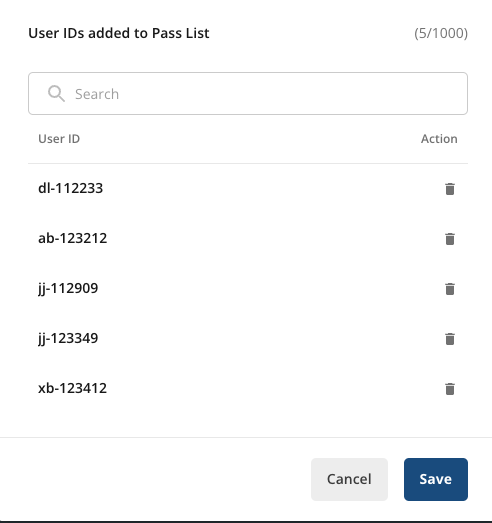 * Once you have updated the lists, hit **Save**
### Testing an Override
Once your override has been added, you can test it in the "Test Gate" window by simply adding userID as a property of the user object.
* Once you have updated the lists, hit **Save**
### Testing an Override
Once your override has been added, you can test it in the "Test Gate" window by simply adding userID as a property of the user object.
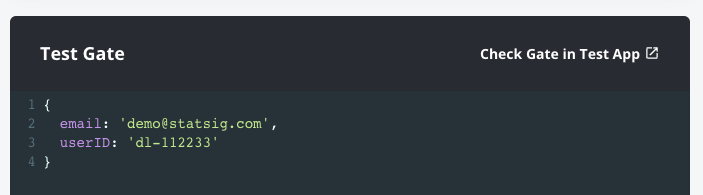 Users that pass will see "PASS (User ID Override)"
 Users that fail will see "FAIL (User ID Override)"
