> ## Documentation Index
> Fetch the complete documentation index at: https://statsig-4b2ff144-mintlify-add-local-eval-country-note-96362.mintlify.site/llms.txt
> Use this file to discover all available pages before exploring further.
# SCIM User Provisioning
## Introduction
SCIM (System for Cross-domain Identity Management) is a standardized protocol that simplifies the automation of user provisioning and management across multiple platforms.
By integrating SCIM with your preferred Identity Provider (IdP), such as Okta,
you can securely and efficiently manage user creation, updates, and de-provisioning within Statsig.
We currently only offer an Okta SCIM integration.
## How To Obtain SCIM Auth Key
The SCIM key includes the `scim` prefix.
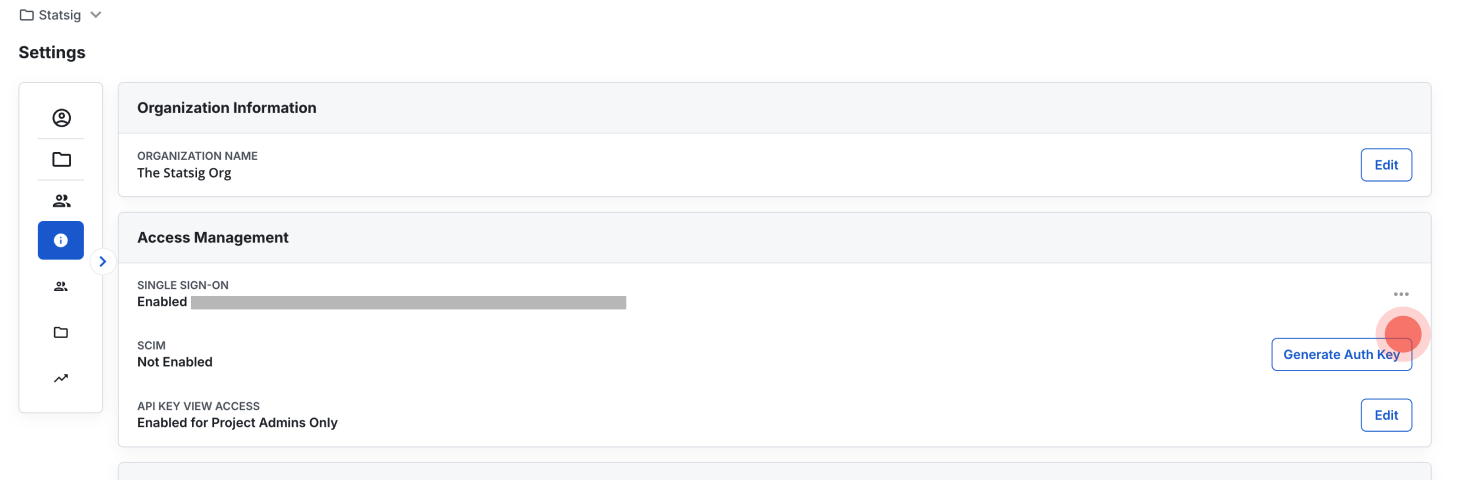 1. Navigate to Organization Access Management:
Go to Settings > Organization > Organization Info > Access Management.
2. Generate a Key:
If SCIM is not yet enabled, generate a new authentication key.
3. Deactivate the Key:
To disable the key, select Deactivate.
4. Regenerate the Key:
If you suspect the key has been compromised, you can regenerate a new one to replace it.
## Current SCIM Offering
### Okta
* **Push Users.** Assigning users to the Statsig application in Okta automatically adds the users as members of your organization in Statsig. Unassigning users deactivates them and wipes all roles/permissions.
* **Import Users.** Users in Statsig can be imported into Okta and either matched to existing Okta users, or created as new Okta users.
* **Import Groups.** Import project/team roles as groups in Okta. Note that imported groups cannot be modified in Okta.
* **Push Groups.** Groups can be pushed to Statsig to update user project/team roles.
[Okta Setup Guide](https://docs.statsig.com/access-management/scim/okta_scim_setup)
## Changelog
We are actively developing SCIM functionality and have rolled out the following features:
| Date | Title | Log |
| -------- | -------------------------------- | --------------------------------------------------------------------------------------------------------- |
| 10/3/24 | Okta Org-level User Provisioning | - Users can be imported from Statsig into Okta
1. Navigate to Organization Access Management:
Go to Settings > Organization > Organization Info > Access Management.
2. Generate a Key:
If SCIM is not yet enabled, generate a new authentication key.
3. Deactivate the Key:
To disable the key, select Deactivate.
4. Regenerate the Key:
If you suspect the key has been compromised, you can regenerate a new one to replace it.
## Current SCIM Offering
### Okta
* **Push Users.** Assigning users to the Statsig application in Okta automatically adds the users as members of your organization in Statsig. Unassigning users deactivates them and wipes all roles/permissions.
* **Import Users.** Users in Statsig can be imported into Okta and either matched to existing Okta users, or created as new Okta users.
* **Import Groups.** Import project/team roles as groups in Okta. Note that imported groups cannot be modified in Okta.
* **Push Groups.** Groups can be pushed to Statsig to update user project/team roles.
[Okta Setup Guide](https://docs.statsig.com/access-management/scim/okta_scim_setup)
## Changelog
We are actively developing SCIM functionality and have rolled out the following features:
| Date | Title | Log |
| -------- | -------------------------------- | --------------------------------------------------------------------------------------------------------- |
| 10/3/24 | Okta Org-level User Provisioning | - Users can be imported from Statsig into Okta
- Users can be provisioned and deprovisioned via Okta |
| 10/12/24 | Okta Full Name Sync | - Full Name synced from Okta to Statsig |
| 10/16/24 | Project x Role | - Role at each Project level of Statsig synced with Okta Group Role |
| 10/23/24 | Self-serve SCIM UI | - Clients can generate and manage SCIM auth key on Console UI |
| 10/24/24 | Okta Org Role management | - Users' organization roles can be managed in Okta |
| 2/27/25 | Okta Team x Role Management | - Users can be assigned to teams and roles in Statsig via Okta SCIM |